" height="101px" id="nbwo4Zi91" width="372.00001062700176px"/></svg>)
Blog

Liel Strauch
|
|
Reading Time:
7
min

01
Every Layer Looks Normal
Most phishing puts something abnormal where a filter can see it. Armored PDF attacks spread the attack across layers so that no single layer has anything wrong with it.
In a typical phish, the malicious indicator sits in the email itself: a bad link, an executable, coercive language. Check that one artifact against reputation sources and you have a decision.
Armored attacks break that model. Each piece is harmless until it is combined with the others, in the right order:
The passcode is in the message, but the link isn't. The subject or body carries a cleartext passcode or an instruction, with nothing to click. The hostile destination lives somewhere else.
The link is encrypted. The attachment is locked with a user password using PDF's standard security handler, which encrypts every string and stream in the file: page content, text, images, and the URL stored in each link annotation. Only the structure around them stays in cleartext. In a file without compressed object streams, that is enough for a scanner to tell that the document has one page, one image and one link, but never where that link points until the password is applied. Pack those objects into object streams and even that outline disappears.
Or the link is a picture. When the decrypted page shows a QR code instead of a link annotation, the destination exists only as pixels. Recovering it means rendering the page and decoding the barcode.
Note what the encryption is for. A password delivered in the same message as the file protects nothing, because the recipient already holds both halves. Its only function is to make the attachment opaque to anything that inspects it without reading the lure. That is what "armored" means here. Legitimate encrypted-document workflows send the password separately, or key it to something only the recipient already knows.
02
The Attack Path
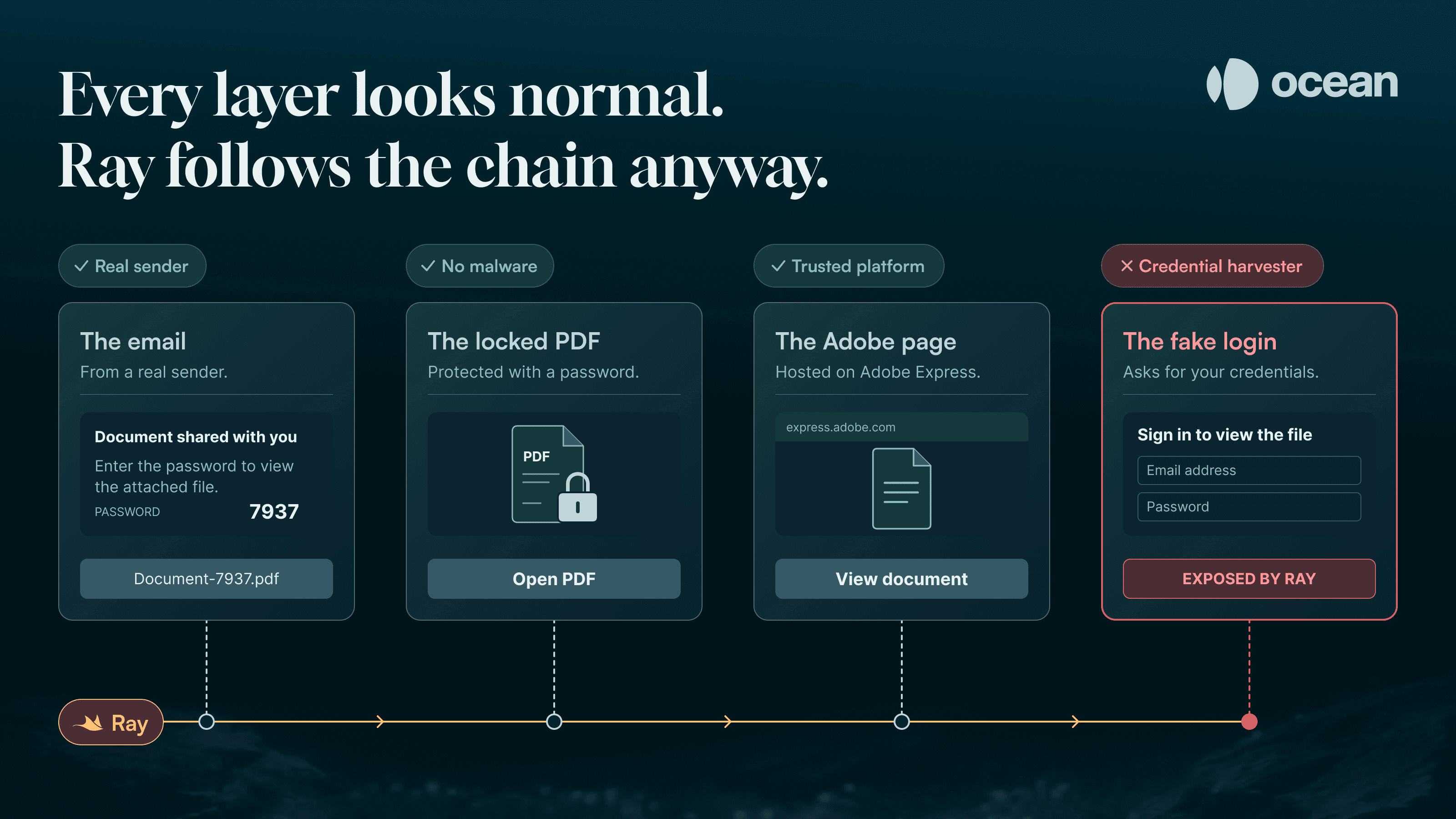
An armored PDF walks the recipient from one trusted place to the next. Each step hands off to the one after it, and the recipient supplies the missing piece.
Inbound Delivery - Compromised M365 · SPF pass, aligned
Encrypted Asset - PDF locked (user password)
Human Bridge - User applies password from lure
Trusted SaaS Hop - Adobe Express click-through
Hostile Destination - Credential harvester
Multi-Stage Execution Path. Agentic investigation connects steps 1, 2, and 3 to unlock the asset, then clicks through steps 4 and 5 to expose the hostile destination.
Trusted ingress. The email comes from a compromised real mailbox or from attacker-registered infrastructure. In the first case SPF passes and aligns, because the message really does come from the domain it claims.
Encrypted shielding. Without the password, page content and link targets are ciphertext. A pipeline that can’t supply the password can at best see the document’s shape, never where it leads.
The human bridge. The email hands over the key, in the subject line or inside an image, and the recipient types it into their reader.
The trusted hop. The decrypted document's only call to action is a link to a page on a reputable platform such as Adobe Express.
The off-ramp. That page asks the user to "log in to view the file," and the button leads to the credential harvester.
03
Two Campaigns From Our Live Pipeline
Both campaigns below came through Ocean's live detection pipeline. They used different armor, but the attacker's goal was the same in each: make every layer look normal.
Case 1: The Password-Protected Shared Document
The lure came from a compromised Microsoft 365 account at a small education business whose domain has been registered since 2017. Nearly everything about the sender was real: the mailbox, the domain, the M365 tenant, and the signature block at the bottom of the email. SPF passed and aligned with the From domain, because the message really was sent from the organization's own Microsoft 365 tenant. By every sender check, this was a normal email.
Everything the attacker added was the subject line, the image, and the attachment. The whole chain was assembled in about 15 minutes, in four parts:
The subject line carried the key:
[Name] Shared a document with you ( This document is password protected, Please enter password 7937 to access ). The passcode 7937 came from contact details in the compromised user's own email signature.The body was an image at the top, roughly forty blank lines, and then the compromised user's real signature. The padding pushes the signature out of the preview pane but keeps it in the body, so a text-based classifier sees a message that is almost entirely genuine. Everything persuasive, including the password instructions, was rendered as pixels inside the image.
The attachment was
Document-7937.pdf, so the password appears in the filename as well as the subject. Once unlocked, the document contained no malware. It held a single button reading "REVIEW FULL DOCUMENT HERE".The Adobe Express page was the button's destination, a project page on
new.express.adobe[.]comunder a published project identifier. It told the victim to "Login with your receiving email for a secured authentication to view document" above a button reading "VIEW FULL DOCUMENT HERE". That button led tojverster[.]store, a disposable credential harvester on a cheap .store domain registered in March 2026. The registrar has since placed the domain on clientHold, and it no longer resolves.
Opening an encrypted document with an obvious password is easy for static rules. The hard part is following the chain when a clean document points to a trusted platform like Adobe.
Case 2: The Salary-Adjustment Quishing Campaign
In a second campaign, seen across multiple enterprise tenants, attackers sending from krs-mail[.]com sent personalized salary adjustment notices. There was no password this time. The armor was optical rather than cryptographic: each PDF memo opened freely, but the one thing in it that mattered, the destination, existed only as a QR code.
Every message came from a different, single-use sender address of the form HR.<target-domain>-Internalmemo-<token>@krs-mail[.]com, with the recipient organization's full domain in the local part, followed by 60 random lowercase alphanumerics. The display name was <Target> - HR Department, the subject <Recipient name> Salary Adjustment Notification - <date>, and the attachment <Recipient name> Adjustment Confirmation.pdf. Each message was personalized at every layer the recipient sees and unique at every layer a filter would hash. The only thing shared across tenants was the bounce address, bounces-478387774-0@myhr1.krs-mail[.]com.
The lure was a memo about the recipient's own pay, with a code to scan on their phone. Text extraction found nothing to check, because the URL was encoded as pixels. Ray rendered the page and decoded the QR code, which pointed to <target>.com-hr-portal[.]info, a subdomain of the attacker's com-hr-portal[.]info. The victim's own domain comes first, so at a glance the address reads as <target>.com. Each tenant got its own subdomain, and all of them led to the same credential-harvesting infrastructure.
04
Why Deep Agentic Investigation Excels
Static rules don't miss these attacks because they can't decrypt files. They miss them because they judge each step on its own, and each step looks normal.
A rule can read a password out of an email body and unlock a PDF. What it finds inside is a document with no exploit code, no malware, and one link to a high-reputation domain like adobe.com. Judged on its own, that is a normal file. The rule marks it safe and stops.
Ray, Ocean's agentic investigation engine, treats that file the way a senior incident responder would: as one step in a chain, and a reason to ask where the chain goes next.
Finding the passcode. When an attachment is password-protected, Ray looks for probable passcodes in the subject line, the body, the attachment filename, and text recovered from embedded images with OCR, including formatted PINs and bracketed numeric tokens.
Opening the file. Ray tries the candidate passcodes against the file, and the one that opens it is the key. It then parses the object tree, cataloging every /Link annotation and /URI action, every bare URL in the page text that a reader would auto-link, and every form or launch action.
Rendering every page. Ray rasterizes each page and scans the rendered image for QR codes rather than relying on extracted images. A QR code drawn as vector shapes has no image object to extract, but it still appears on the rendered page. The decoded payload becomes a URL and is investigated like any other link.
Clicking through. Ray doesn't stop at the first hop. When a link leads to a publishing platform like Adobe Express, Canva, or Microsoft Sway, Ray loads the page in a real browser. These pages are JavaScript applications, and a plain HTTP fetch typically returns an empty shell with no button in it. Ray finds the call to action (in this campaign, "VIEW FULL DOCUMENT HERE"), clicks it, and exposes the credential-harvesting portal behind the reputable host.
DETECTION ENGINEERING BLUEPRINT
Password in the same message as the lock. Flag an externally sent, user-password-encrypted PDF whenever the subject, body, image OCR text, or attachment filename contains a plausible passcode. The /Encrypt dictionary is readable without the password, so the first half of this check costs nothing.
Decrypt, then read the link annotations. Once the file is open, enumerate /Link annotations and their /URI actions, and flag destinations on public publishing platforms (express.adobe.com, canva.site, pages.dev), especially when that link is the document's only interactive element. A single page whose only content is one image and one link annotation is a strong signal before the link is even resolved.
DEFENSIVE RECOMMENDATION
Don't block trusted SaaS publishing hosts across your network. Blocking services like express.adobe.com disrupts normal business collaboration. Instead, inspect the content of the asset itself, watch browser or proxy telemetry for password submissions to domains outside your identity provider, and deploy phishing-resistant MFA. With FIDO2 or passkeys, a harvested password opens nothing. OTP and push approvals don't give the same guarantee if the kit proxies the login in real time.
When an attack spreads its payload across an encrypted attachment, a barcode, and a trusted web page, no single check finds anything wrong, because every piece looks normal. Ray connects the pieces. It reads the lure, opens the file, and follows the clicks until the harvester is exposed.